Customize Floating Ornament Inserts in Canva
A Designer’s Guide to the Floating Ornament Insert Canva Template
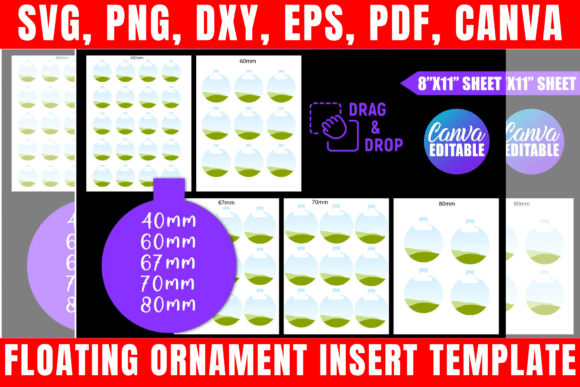
As a designer or creative entrepreneur, you understand that the smallest details often carry the most weight. The Floating Ornament Insert Canva Template is a specialized design asset that bridges the gap between digital artistry and physical product creation. This template is specifically engineered for use with round, clear plastic ornaments, creating a mesmerizing "floating" effect where text or graphics appear suspended within the glass sphere. Visually, the template is clean and modern, prioritizing clarity and crisp edges to ensure that the final printed product looks professional. It offers a minimalist aesthetic that allows your specific branding or message to take center stage, making it an incredibly versatile tool for seasonal decorations, corporate gifts, or personalized keepsakes.
The true appeal of this template lies in its adaptability. Unlike rigid static files, the Floating Ornament Insert Canva Template invites you to play with composition. Whether you are layering a modern sans serif font for a corporate holiday gift or a whimsical script font for a family heirloom, the template provides a structured canvas that guides your creativity. It is designed to be intuitive, meaning you don't need to be a Photoshop expert to achieve high-quality results. The visual personality of the final product is entirely up to you—it can be rustic and textured, sleek and corporate, or festive and colorful.
Real-World Applications: From Branding to Keepsakes
Understanding where this design asset fits into your workflow is key to maximizing its value. For small business owners, the Floating Ornament Insert Canva Template is a secret weapon for holiday marketing. Imagine creating custom ornaments featuring your logo design or a specific brand message to send to top clients. This level of personalization strengthens brand identity and client loyalty. It moves beyond standard paper cards and creates a lasting physical artifact that sits on a client’s desk or tree for years. The ability to maintain brand consistency across these physical products ensures that your company’s visual hierarchy remains strong, even in a decorative context.
For crafters and hobbyists, the applications are just as robust. You can utilize this template to create matching decorations for weddings, baby showers, or milestone birthdays. The "floating" nature of the insert adds a touch of modern typography and elegance that standard flat cards cannot match. Because the template includes SVG and DXF files, it is also fully compatible with cutting machines like Cricut and Silhouette. This allows for precision cutting of the circular inserts, ensuring a perfect fit inside the ornament every time. Whether you are selling these on Etsy or making them for family, the template streamlines the production process, allowing you to focus on the creative aspects of packaging design and presentation.
Technical Versatility and Design Compatibility
A major strength of this package is its comprehensive file compatibility. The Floating Ornament Insert Canva Template isn't limited to just one software ecosystem. By providing SVG, PNG, DXF, and PDF files, it ensures that your workflow remains uninterrupted regardless of the tools you prefer. The SVG file is particularly valuable for those using vector-based software like CorelDraw, Inkscape, or Adobe Illustrator, as it allows for infinite scalability without loss of quality. This is crucial when you want to adjust the size of your graphics or text to fit specific ornament dimensions perfectly.
Furthermore, the inclusion of the Canva link democratizes the design process. Canva is a powerful tool for social media graphics and web design, but it is also increasingly used for print-on-demand products. The drag-and-drop interface makes it easy to experiment with different font pairings. You might pair a bold display font with a delicate serif font to create visual interest and hierarchy within the ornament insert. The template supports this experimentation, allowing you to test how different typefaces interact with the circular shape of the ornament. This flexibility is essential for creating a cohesive brand identity, especially if you are producing a series of ornaments for a specific campaign or product line.
Strategic Use of Typography and Color
When working with the Floating Ornament Insert Canva Template, your choice of typography will define the final product's impact. Because the insert is viewed through clear plastic, readability is paramount. It is recommended to avoid overly thin or overly decorative handwritten fonts that might get lost or blur when viewed through the material. Instead, consider using a modern sans serif font for primary information, as these tend to maintain high legibility at smaller sizes. If you want to incorporate a script font for elegance, ensure it has a medium weight and clear letter spacing.
Color strategy is equally important. Since the background is typically clear or white, high-contrast color palettes work best. A deep navy or charcoal text on a white insert creates a timeless, professional look suitable for corporate branding. For more festive applications, vibrant reds and greens or metallic golds can be used to evoke a specific mood. However, always consider how the colors will look when layered over the contents of the ornament. If you plan to fill the ornament with glitter, sand, or other materials, ensure your text color stands out against that backdrop. The Floating Ornament Insert Canva Template allows you to toggle layers and test these combinations before you commit to printing.
Practical Workflow for Entrepreneurs and Creators
For those looking to monetize this design asset, establishing a streamlined workflow is essential. Start by downloading the Floating Ornament Insert Canva Template and familiarizing yourself with the file structure. Create a master file in Canva or your preferred software where you can store your brand assets, logos, and preferred font pairings. This ensures that every ornament you produce is consistent with your overall brand identity.
When evaluating project fit, consider the physical manufacturing process. The template is designed for round clear ornaments, so ensure your printing paper is of high quality—cardstock is often preferred for its durability and opacity. Test print your first design on standard paper to check the sizing against your specific ornament model before using premium materials. This practical step saves time and resources. Additionally, keep in mind the licensing terms: while you can use the files to create physical products for sale, the digital templates themselves cannot be shared or redistributed. This protects your unique designs and maintains the value of your product in the marketplace. By treating the Floating Ornament Insert Canva Template as a foundational design asset rather than just a one-off file, you can build a scalable product line that resonates with your audience.