Circle Coaster Mockup & Template: Your Design Shortcut
Let's be honest. You've spent hours perfecting a design for a client's new cafe, a wedding favor, or your own Etsy shop. The artwork is crisp, the colors are right, and the typography is on point. But then comes the presentation. How do you show a client how their logo will look on a physical product? How do you create a compelling product photo for your online store without a full photography setup? This is where a reliable, professional mockup becomes less of a luxury and more of a necessity. The Circle Coaster Mockup & Template is that practical tool, designed to bridge the gap between your digital canvas and a tangible, market-ready product.
More Than Just a Pretty Picture
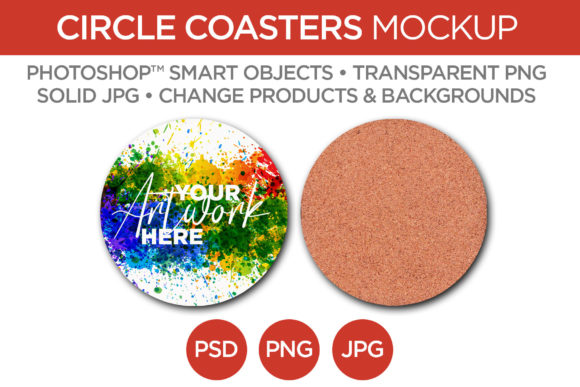
At its core, this mockup file is a pre-photographed, professionally lit scene of a 3.75-inch circle coaster. The key is in its construction. The coaster itself is rendered with authentic materials—think the warm, natural grain of cork and the smooth, sturdy feel of hardwood. You get two distinct angles: a straight-on view perfect for clean, minimalist presentations and a slight isometric perspective that adds a touch of depth and context. This variety allows you to choose the framing that best suits your design's personality, whether it's bold and modern or rustic and handcrafted.
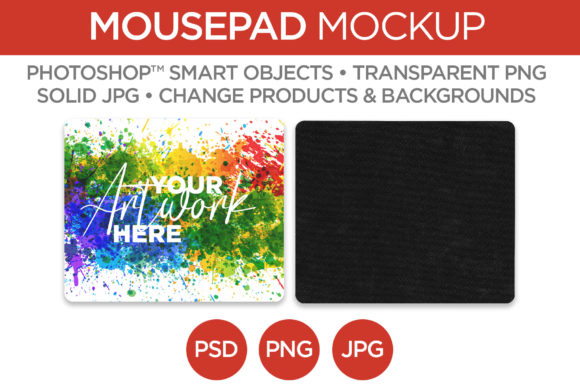
The real magic, however, lies in the editability. Using Adobe Photoshop Smart Objects, the process is streamlined to its essence. You double-click a layer, paste your artwork, save, and watch your design instantly wrap onto the coaster with realistic lighting and shadow. It’s a massive time-saver that lets you focus on the creative work, not the technical setup. Beyond the artwork, you can also change the coaster's material color and the background, ensuring the final mockup aligns perfectly with your brand's color palette or project aesthetic.
Practical Applications for Your Brand and Business
Think about the last time you needed to visualize a circular product. The applications for this Circle Coaster Mockup extend far beyond coasters, making it a versatile design asset.
- For Entrepreneurs & Small Business Owners: If you're launching a line of branded merchandise, this mockup is invaluable. Showcase your logo design on a coaster for a cafe, brewery, or tech company. Create quick, professional product shots for your Shopify store or Instagram feed without hiring a photographer. It’s a direct way to communicate quality and professionalism to potential customers.
- For Graphic Designers & Marketers: Client presentations just got easier. Instead of describing how a design will look on a physical object, you can show them. This builds confidence and speeds up approval cycles. It’s also perfect for creating mockups for packaging design concepts or point-of-sale displays.
- For Content Creators & Bloggers: Need a stylish flat lay for a blog post about home decor, gift ideas, or event planning? This mockup provides a ready-made, styled element. You can place your own graphics or text on the coaster to create unique, branded imagery for your social media graphics or website.
- For Crafters & Hobbyists: Selling handmade coasters on platforms like Etsy? Use this template to create consistent, high-quality listing images. You can experiment with different patterns and colorways digitally before committing to materials, saving both time and money.
Making It Work: A Guide to Effective Use
Getting the most out of this tool requires a bit of thoughtful application. First, consider the visual hierarchy of your design within the circular format. A complex, detailed logo might get lost, while a bold, simple icon or monogram will pop. Test your artwork at the mockup's resolution (2000x2000 pixels at 300 dpi) to ensure fine lines and small text remain crisp and readable when viewed on screen.
The included file formats—PSD, JPG, and transparent PNG—cover most workflows. The layered PSD is your primary editing file. The transparent PNG is perfect for dropping your mockup directly into other designs in software like Canva, Affinity Photo, or even PowerPoint, without worrying about a white box around it. The solid JPG is a ready-to-use presentation file once you've inserted your artwork.
When it comes to font pairing and overall design, let the mockup inform your choices. If the coaster material is textured like cork, a clean sans serif font can provide a pleasing contrast. A smooth hardwood finish might pair well with an elegant serif font or a delicate script font for a wedding theme. The mockup isn't just a backdrop; it's part of the composition. Use the changeable background to create mood—a dark slate background for a moody, sophisticated feel, or a light marble texture for a clean, modern look.
Ultimately, the Circle Coaster Mockup & Template is about removing friction from the creative process. It’s a practical, no-nonsense tool for designers and creators who need to present their work professionally, whether for a client, a customer, or their own portfolio. By handling the complex photography and lighting, it gives you back the one resource you can't manufacture: more time to create.